/mockup
Ide lo jadi prototype yang bisa diklik, dalam hitungan menit.
Nunggu slot desainer bisa berhari-hari, dan slide statis cuma bikin orang "bayangin aja". Ceritain alurnya ke AI lo, dan tiap layarnya bisa langsung dipencet dan didemo.
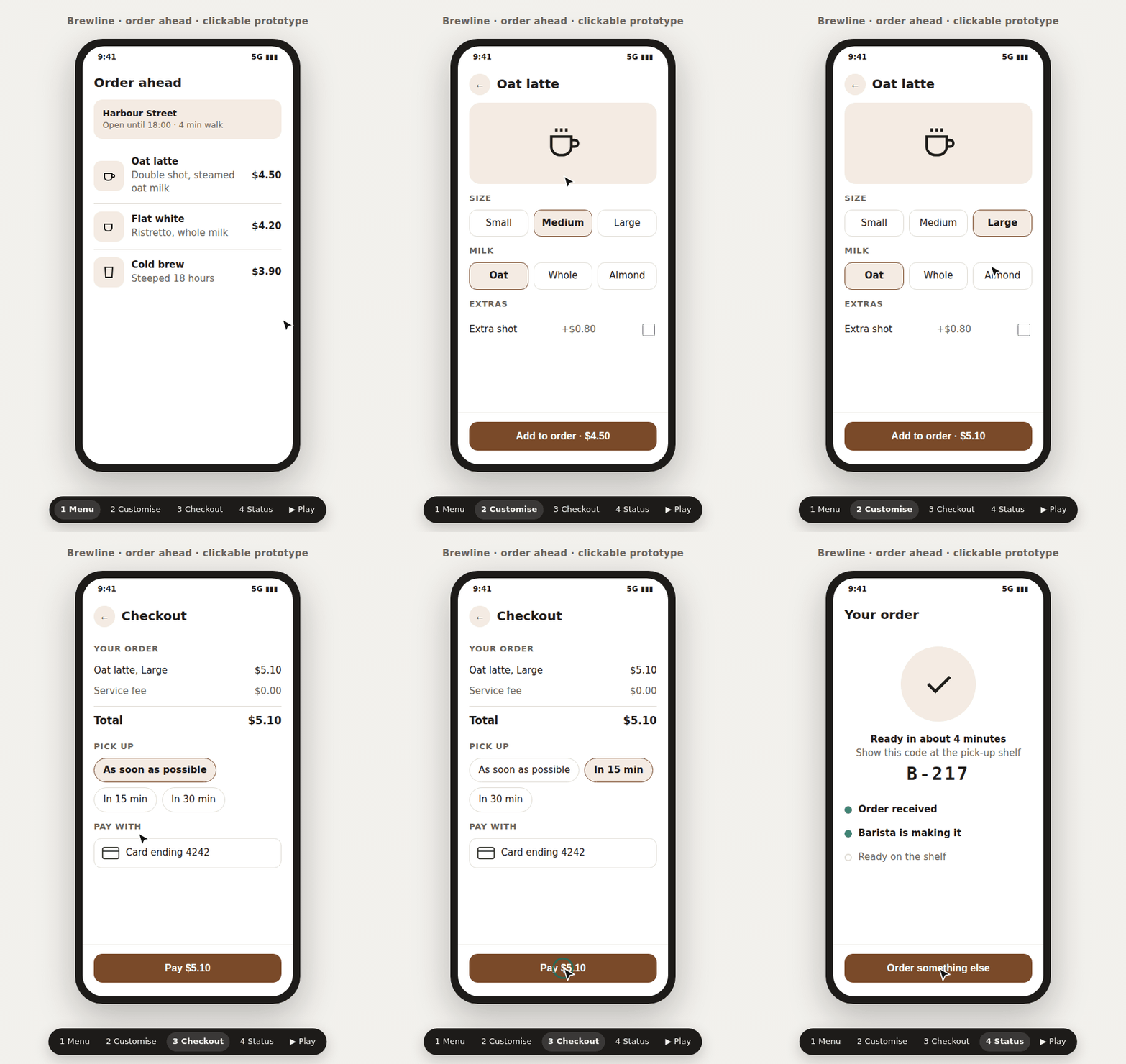
Gratis hari ini di template AI Second Brain. Versi yang bisa jadi link dan dikomentari ada di AI Prototype Kit.
Kabar baiknya
AI sekarang bisa bikin layar yang beneran jalan.
Dulu, sesuatu yang bisa diklik butuh desainer dan berhari-hari. Sekarang AI kayak Claude bisa bikin layar yang tombolnya beneran jalan.
Masalahnya
Tapi kebanyakan pitch masih pakai slide dan "bayangin aja".
Malam sebelum pitch
Besok pagi harus pitch fitur baru. Desainer penuh sampai minggu depan.
Di meeting
Slide isinya kotak-kotak. Lo ngomong "bayangin aja ya, nanti kalau diklik muncul...".
Setelah approval
Semua bilang oke. Dua minggu kemudian ketahuan yang mereka bayangin beda, karena gak ada yang bisa nyoba ngeklik.
Pas demo live
Lo klik satu tombol, gak ada apa-apa. Di depan klien, lo bilang "anggap aja ini jalan".
Solusinya
Sekarang lo bawa alur yang bisa diklik.
Ceritain alurnya ke AI lo. Dia cek urutan langkahnya dulu, lalu bikin tiap layarnya: bisa dipencet semua, ada bingkai HP buat aplikasi, tombol presenter buat demo, isi yang realistis, mode terang dan gelap. Pakai AI Prototype Kit, prototype-nya jadi link yang bisa dikomentari dan AI lo revisi dari komentarnya.
Bedanya
Sebelum dan sesudah.
Sebelum
- Nunggu slot desainer berhari-hari.
- Pitch pakai slide dan "bayangin aja".
- Orang setuju sama alur yang cuma dibayangin.
- Demo macet di tombol yang gak ngapa-ngapain.
Sesudah
- Prototype jadi di hari yang sama.
- Pitch pakai alur yang bisa diklik.
- Orang nyobain alurnya dulu, baru setuju.
- Tiap tombol jalan, dan udah dicek sebelum lo pakai.
Cara kerjanya
Tiga langkah, udah.
Ceritain alurnya
Ketik /mockup ke Claude, lalu alurnya dalam bahasa biasa. Misalnya: pesan kopi dari menu sampai ambil pesanan.
AI cek urutan langkahnya
AI nulis urutan langkahnya dulu dan ngecek ke sumbernya, baru bikin layarnya.
Buka dan demoin
Buka di browser. Tekan angka buat lompat ke layar, spasi buat muterin alurnya sendiri.
Yang bisa dia lakuin
Bukan gambar layar. Alur yang beneran bisa lo pencet.
Dibikin supaya aman dipakai demo live.
- 01
Alurnya bener dulu, baru layarnya
AI nulis langkahnya dulu: siapa ngapain, apa yang keliatan, dan apa yang terjadi kalau gagal. Jadi yang disetujuin orang itu alur yang bener.
ContohLo: "/mockup alur refund, dari customer minta sampai uangnya balik." AI: daftar langkahnya dulu, termasuk kalau refund-nya ditolak. - 02
Yang belum diputusin gak ditebak diam-diam
Kalau satu langkah belum diputusin, AI bikin jalur yang direkomendasiin dan nandain pilihan lainnya langsung di layar.
ContohDi layar bayar ada label: "Alternatif: bayar di kasir, belum diputusin." - 03
Gak ada tombol mati pas demo
Tiap layar bisa dicapai. Tombol yang emang belum jalan keliatan nonaktif, dan AI nyobain tiap layar sebelum nyerahin ke lo.
Tombol diklik, gak ada apa-apa.Diklik, pindah ke layar berikutnya. - 04
Keliatan kayak aplikasi beneran
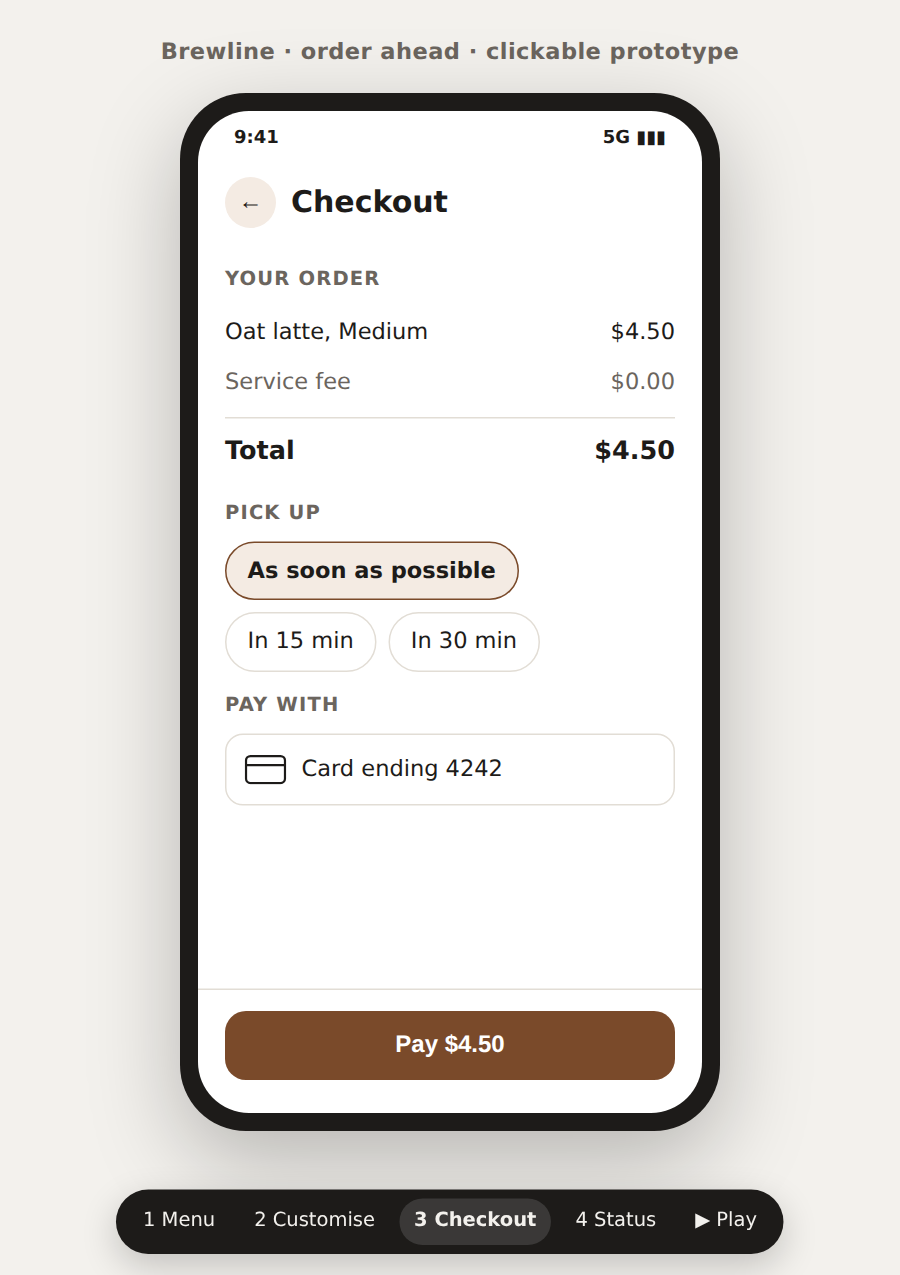
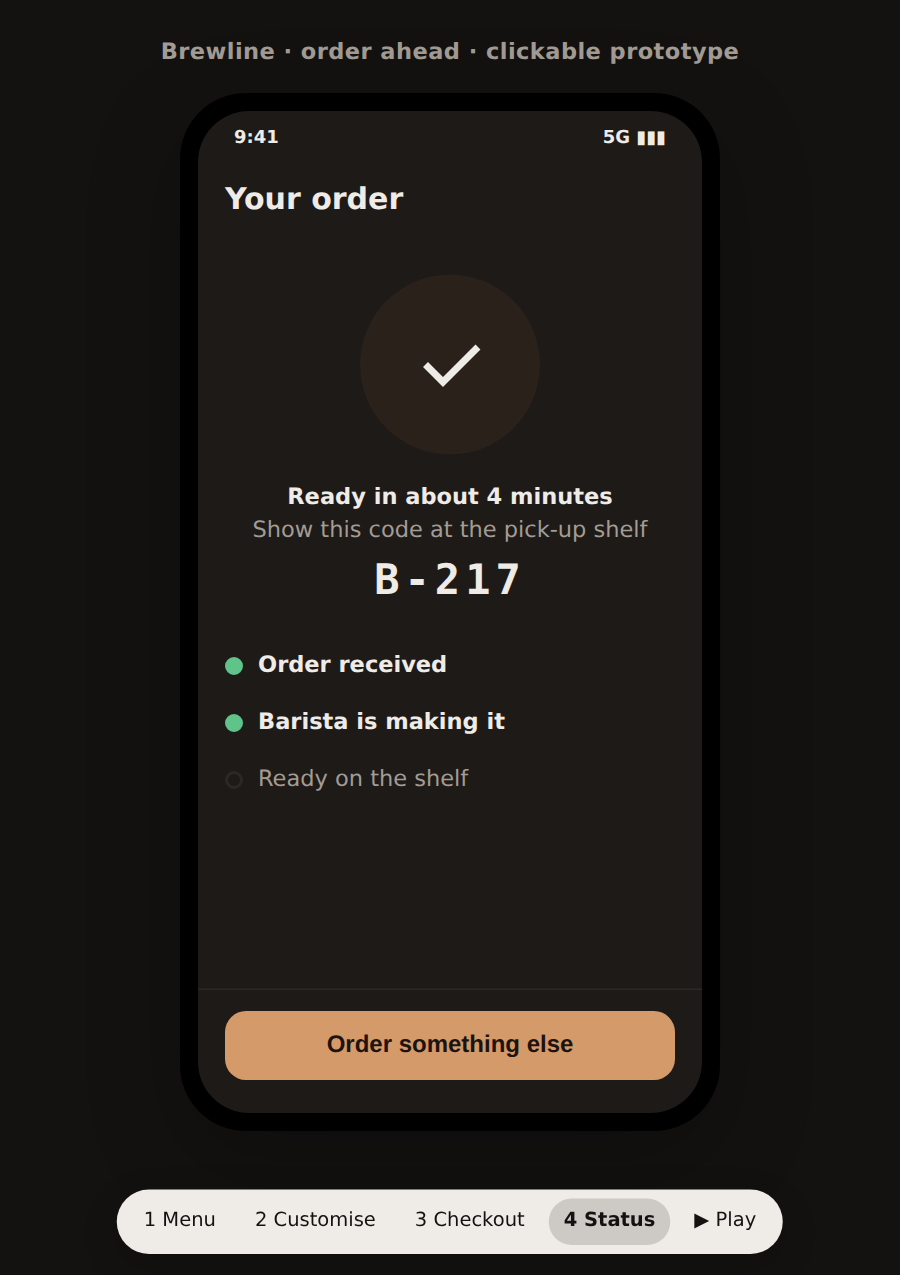
Alur di HP tampil di dalam bingkai HP, jadi orang langsung tau ini aplikasi, bukan web. Ada mode terang dan gelap juga.
Lo bilang ke AI"/mockup onboarding aplikasi di HP, sampai layar pertama setelah daftar." - 05
Presentasi cukup pakai keyboard
Angka buat lompat ke layar, panah buat maju mundur. Daftar tombolnya muncul di layar, jadi lo gak perlu hafal.
ContohKlien nanya soal checkout? Tekan 3, langsung ke layarnya. - 06
Jalan sendiri, lo tinggal ngomong
Alurnya bisa jalan otomatis, jadi lo fokus ngejelasin. Satu tombol nyembunyiin bar presenter, jadi rekaman video demonya bersih.
ContohSpasi buat muter alurnya. H buat nyembunyiin bar, lalu rekam video buat investor. - 07
Isinya kayak data beneran
Nama, harga, mata uang, dan bahasanya realistis. Jadi review-nya ngebahas alurnya, bukan teks contoh yang belum diganti.
"Produk A, $0, lorem ipsum.""Oat latte, Medium, $4.50." - 08
Satu file, kebuka di mana aja
Semua layar ada di dalam satu file tanpa apa pun dari internet, dan AI ngecek itu sebelum nyerahin. Kirim lewat email, dibuka di laptop klien, tetap jalan.
ContohWifi ruang meeting klien mati. Prototype-nya tetap kebuka dan semua tombolnya jalan.
Demo customer journey yang gw bawa ke klien bulan ini gw bikin kayak gini, bukan nunggu slot desainer. Yang gw bawa ke meeting itu alur yang bisa diklik, bukan slide.
 Brian Arfi FaridhiProduct Director di Merit · AI Builder · Pembuat alat iniBagian dari template dengan 33 bintang di GitHub
Lihat jalannya
Keraguan yang wajar
Yang biasanya ditanyain dulu.
- Ini ngegantiin desainer?
- Gak. Ini buat tahap biar semua orang paham dan setuju dulu. Desain final tetap kerjaan desainer, dan mereka dapat brief yang udah divalidasi.
- Harus bisa coding?
- Gak. Lo ngobrol sama AI lo. Yang lo butuhin Claude Code, atau AI coding tool lain yang bisa ngikutin instruksi dan ngedit file. Masang template-nya butuh sedikit terminal, sekali aja.
- Gimana ngirim prototype-nya ke orang?
- Hasilnya satu file yang kebuka di browser mana aja, tanpa gambar atau font dari internet. Mau jadi link yang bisa dikomentari? Pakai AI Prototype Kit dan akun Cloudflare gratis. Dia nanya dulu sebelum apa pun online.
- Beneran gratis?
- Iya. /mockup ada di template AI Second Brain. Template-nya Apache-2.0, boleh dipakai buat kerjaan kantor. AI Prototype Kit juga open source.
- Kalau alurnya sendiri belum final?
- Justru pas. AI bikin jalur yang direkomendasiin dan nandain pilihan lainnya di layar, jadi keputusannya kebahas di meeting, bukan ketebak diam-diam.
/mockup
Meeting berikutnya, bawa alur yang bisa diklik.
Ambil gratis di template AI Second Brain. Mau link dan komentar per layar juga? Ada di AI Prototype Kit.
Buat yang teknisCara pasang, kebutuhan, lisensi, dan changelog lengkap.
Cara pasang
Dari nol sampai jalan.
Langkahnya diambil dari README repo-nya. Tinggal salin.
Pasang template AI Second Brain
Sekali aja, lewat terminal. Jalur cepatnya kira-kira 15 menit, tanpa API key. /artifact, /mockup, dan /deck udah ikut di dalamnya.
bashgit clone https://github.com/BrianArfi/ai-second-brain.gitcd ai-second-brainbash install.shclaudeCeritain alurnya
Di Claude Code, ketik /mockup plus alurnya dalam bahasa biasa. AI nulis urutan langkahnya dulu, ngecek ke sumbernya, lalu bikin satu file HTML.
Claude Code/mockup an order-ahead flow for a coffee shop: menu, customise the drink, pay, pick-up statusBuka dan demoin
Buka file-nya di browser. Angka buat lompat ke layar, panah buat maju mundur, spasi buat muter alurnya, H buat nyembunyiin bar presenter, T buat ganti terang atau gelap.
Kebutuhan
- Template AI Second Brain, dipasang sekali. /mockup ikut di dalamnya.
- Claude Code, atau alat AI agent lain yang bisa ngikutin instruksi markdown dan ngedit file.
- Hasilnya satu file HTML tanpa gambar, font, atau skrip dari internet. Kebuka di browser apa pun.
- Opsional: AI Prototype Kit dan akun Cloudflare gratis buat link dan komentar per layar.
Lisensi
Apache-2.0
Versi, lisensi, dan changelog dicek ulang ke sumbernya 2026-10-01
Changelog
Apa yang berubah, versi demi versi.
/mockup tinggal di template AI Second Brain, jadi ini changelog template itu. Dicek 2026-10-01.
Versi 0.8.1Terbaru1 Okt 2026
Changed
- The README tells you what the template does for you first. It opens with the shift, the gap and the fix, a diagram of the daily loop and a table of what is inside, then the quick start. The deeper reference moved to
docs/ARCHITECTURE.md,docs/DASHBOARD.mdanddocs/SETUP.md, so nothing was dropped. /daily-updatereads your timezone fromCLAUDE.md. It no longer assumes WIB.- Domain sharing reads
WORK_DOMAINfrom your environment or.env, so a fork shares Google files to its own domain without editing code.
Fixed
- Runtime files that a demo session committed by mistake are removed:
.agent/harness.json, a ledger session file, a dashboard cache and a sample commitment. - The ledger watcher counts a Google Doc update only when
gdoc_surgical.pyruns a command that writes. Reading its source or runningreadno longer blocks the end of a turn.
Versi 0.8.030 Sep 2026
Added
- What's new tab in the dashboard. The local dashboard renders this changelog, newest release first, from
/api/changelog. The text is escaped before it is rendered, HTML comments are dropped, and links to repository files show as plain text. - Reply drafts show what they answer. A new
reply_draft_guard.pyhook blocks a reply draft underjournal/drafts/that does not quote the original message, with sender and time, and the thread so far. It also blocks draft text inside a code fence, because a fence does not wrap.
Changed
- Release notes come from this file.
sync.pybuilds the GitHub release body from the changelog section for the version being cut. When that section is missing it uses the Unreleased section, and when that is empty too it falls back to the commit titles, as before. Until now every release said "Harness sync from the private repo". - Versions v0.2.0 to v0.7.0 have their own sections. They were backfilled from the git tags, the public repo's diff per tag range, and the private commit log. Each section names its sources in an HTML comment.
- Release headings use the
## [x.y.z] - YYYY-MM-DDform.tools/pack.pyreads both this form and the older## vX.Y.Zform.
Fixed
- The meeting recorder survives a trimmed
common.py. The pipeline helpers moved tomeeting-recorder/pipeline_common.py, andcommon.pyre-exports them, so a copy ofcommon.pywithout the helpers no longer stops the watcher. - The conversation claim guard no longer matches a top-level post against open threads in the same channel.
Versi 0.7.028 Sep 2026
Added
- Draft feedback tracker.
draft_feedback.pymeasures how the owner edits the drafts the harness writes, and a weekly job commits the report so weekly planning can read it.draft_need_check.pyruns before a reply is drafted: it skips a message the owner already answered, and suggests a reaction instead of a reply for a plain acknowledgement. It is wired into the reply queue, the reply router brief and the Slack send protocol. - Stale-status guard.
unanswered_status_check.pycross-checks calendar RSVPs and Slack threads, so an item the owner already handled is not reported as unanswered. The daily update runs the calendar check on every run. Identity is resolved at runtime (a newgcal_manager.py whoamiaction and Slackauth.test), with environment variables to override it. - Read-only JQL search in the Jira connector, on every configured site.
- Record one window. The meeting recorder can record the window you were last in, or a window you pick, instead of every monitor (
list_windows,active_window,WindowsCapture). It picks the video encoder that the local ffmpeg actually has.
Changed
send_slop_guard.pywarns when a draft adds lines past what the message needs.
Fixed
- The Windows recorder GUI imported window helpers that
recorder.pydid not ship in v0.3.0 to v0.6.0. They ship now.
Versi 0.6.027 Sep 2026
Changed
- The cheap-model chain adapts to the machine.
cheap_llm.pybuilds its chain from the backends the machine actually has. The default order stays Gemini Flash, then GLM, then Haiku. - Idle work-tree nodes archive themselves. A node with no activity for 30 days is archived by
work_tree_stale.py.work_tree.py add-noderecords the creation time, so a new empty node is never counted as idle.docs/ledger_hygiene.mddescribes the rule.
Versi 0.5.026 Sep 2026
Added
- Ledger verification by script first.
cheap_llm.pyand the ledger CLIs check a record against its evidence with a script first, a cheap model second, and Claude last, so a chase is not sent for work that is already done. - Ledger hygiene rules in
docs/ledger_hygiene.md, withwork_tree_stale.pyfor nodes that have gone quiet. - Google Doc publish checks R1 to R4 in
readability_gate.py: internet links only, sized tables, every promised image exists, and one header field per line.publish_prd.shcan embed screenshots. - Text-drawn diagrams are refused in Google Docs. Use a rendered Mermaid image. Override once with
GDOC_ALLOW_ASCII_DIAGRAM=1. - Work hours per machine. Each host writes its own shard under
journal/state/work_hours_hosts/, and the tracker merges them, so every machine can sweep.
Fixed
- A meeting recorder run with
--oncewrites a heartbeat that stays valid until the next cron tick, so a recording is not reported as "nothing is transcribing it". slack_client.pyreads--text-fileas UTF-8, so bullets do not post as mojibake on Windows.meeting-recorder/common.pyis the full module again, after a trimmed copy replaced it.
Versi 0.4.023 Sep 2026
Added
- Standing rules ship with the template.
CLAUDE.md.templatehad not changed since July, so a fork started without the rules the private harness had learned since. It now carries a Standing Rules section: do the work instead of reporting on it, fix what is broken, never claim an action that has not happened, verify before you report, treat a question as a question, done means done, answer first and stop, record it where it is tracked in the same turn, link every file you name, read a shared document before you replace it, never act on a garbled instruction, and offer to save a correction as a rule. Each one is there because leaving it out caused a failure that repeated. The block sits between two markers, so the desktop app exports the same text and a rule learned once reaches both.
Changed
- A leaner CLAUDE.md, and one less process per command. Incident history, command lists and kill switches moved out of the always-loaded
CLAUDE.mdintodocs/harness_reference.md, word for word, under five new anchors. Each rule stays inCLAUDE.mdas one line plus a link. The no-opdrive_verifyhook, which started a Python process after every Bash call and did nothing, is unregistered. - Moving machines: the record travels, content does not.
harness_migrate.py exportnow leaves video, audio, images, archives and installers behind wherever they sit, and prints how much it skipped. The first real run found 3.5 GB of rendered video in a 3.9 GB bundle. The desktop app's own chat transcripts, which the bundle never carried, now travel and are restored on import. The migrate test runs in a sandbox instead of reading the real app data. - The agy-bridge model table brings the GLM models back and probes their ids live.
/learnsays the truth about memory: it travels with git, and links inMEMORY.mdare relative.
Fixed
- The session model is detected on Windows. The startup routing hook printed "Session model: unknown" on every Windows session, so the delegation table never had a real tier to work from. Two causes, stacked. The transcript lookup replaced only
/when it built the project directory name, while Claude Code replaces every character that is not a letter, a digit or-, so a path with a drive colon never matched. And Python's barebashresolves to WSL'sSystem32\bash.exebefore PATH, so the detection script ran inside Linux against a Windows path. Both are fixed, with a regression test. - Tests that failed for the wrong reason. Three tests failed while the code under them was right: one fed Windows paths unquoted, one used 1970 timestamps that a newer staleness rule reads as ancient, and one asserted a routine that had been deliberately removed. The last one hid a real bug: the reply-router settings schema still said a "Scheduled runs" switch gated it, which it does not. All fixed.
- The access watch credits an on-behalf-of share request to the person who needs access, not to the person who asked.
- The reply router takes back a dispatch that the app never turned into a chat.
Versi 0.3.021 Sep 2026
Added
- One conversation, one session.
conversation_claim_guard.pyrefuses a send into a Slack conversation that another session already owns. - Evidence-gated clean-up for waiting-on records.
answer_hunt.pylooks for an answer in six sources and splits strong evidence from weak leads, anddeprio_discard.pydeprioritises or discards a record only on strong evidence. The lifecycle is indocs/waiting_on_lifecycle.md. - Model drift check.
model_drift_check.pyfinds dead and outdated model ids in the agy-bridge chain before a call fails on them. - Local Ollama backend for agy-bridge, through Ollama's OpenAI-compatible
/v1, with a base URL override. - Calendar attachments.
gcal_manager.py --attachputs a Drive file on an invite, andlist --jsonreports attachments. - Slack channel rename, approval-gated like post and create.
- Automation holds are visible.
automation_settings.pygives every automation oneheldblock that says what is held, why, and when it clears. - Task board builder.
build_task_board.pybuilds one Kanban board from a roadmap sheet and a backlog, ready for a Linear import. - Windows dictation helper.
meeting-recorder/dictate_win.pywrecords from a global hotkey and puts the transcript on the clipboard.
Changed
- The agy-bridge chain moved off retired Gemini ids.
- The work-hours tracker counts every session on every host, and counts automation as parallel output. The dashboard's automatic sweep backfills the whole stale gap.
Fixed
link_guard.pyknows every checkout root and follows writes through UNC paths, and a local file link opens on Windows.- Reply drafts quote the whole original message and show people by name, never by a bare id.
- The ledger guard treats a checkout that is behind as "pull first", not as deleted records.
--convertin the Drive connector maps pptx, docx and xlsx to their Google formats.- The reply-router close status file is mirrored into every checkout.
Versi 0.2.111 Sep 2026
Added
SKILL.mdfiles for thegdoc-commentandgemini-imageskills.
Changed
- The reply router runs from the desktop app scheduler instead of a crontab line that was never installed.
/autodraftdocuments the change.
Fixed
register_prd.pyno longer corrupts the first row of every table it writes to.
Versi 0.2.011 Sep 2026
Added
- Seven new commands. They wrap skills that already shipped with nothing in front of them.
/user-storyturns a feature into stories and holds the line that everyThenhas to be objectively measurable, because "the user sees a friendly message" cannot be tested and will be argued about./ticketdrafts a tracker issue, resolves its work-tree node first, and waits for explicit approval before filing./rcaruns the incident protocol under one rule: no root cause, no "resolved". On the artifact side,/artifactbuilds a self-contained HTML explainer or report,/mockupa clickable prototype with presenter keys,/decka keyboard-driven slide deck, and/diagrama Mermaid diagram validated by an actual render before anyone sees it. The three HTML commands end with the same self-containment grep, because a page that pulls in a font or an image stops working the moment it is sent to someone. - Capability packs.
tools/pack.pyinstalls skills, commands, agents and hooks from one folder as one unit, and never runs code the pack supplies. - The anti-AI-voice gate ships.
.agent/skills/no-ai-slopis now in the template, so/no-ai-slopresolves, andanswer_budget.mdadds the rule that runs first: answer first, stop, and keep to a word ceiling per channel. public_drift_check.pyreports how far the public mirror has drifted without running the sync.
Changed
- The command list says what each group is for. The command set had grown to 32 with flat descriptions, which reads as one long alphabetical list. Every description now leads with a group, so the picker reads in blocks: Daily, Weekly, Product, Artifact, Comms, Notes, Tracking, Thinking, Setup, Harness.
- Six commands retired, none of their procedures deleted. Each moved to a permanent home first and every reference was repointed: the Slack send playbook to
.agent/protocols/slack_send.md, the offload-mode toggle to.agent/skills/agy-bridge/OFFLOAD_MODE.md, and the morning and evening updates into a now self-contained/daily-update, which takesmorningoreveningto force a mode./sync-fathomand/no-ai-slopwere pure wrappers over SOPs that already lived in.agent/. Two wirings would have broken silently and were repointed in the same pass:journal/state/routines.jsonscheduled/morning-updateand/evening-updateas daily routines, and the SessionStart hook printed/glm onas the way to toggle offload mode. /inbox-sweepis now/sweep, andaccess-watchships, so its access pass works.- The end-of-turn ledger sync runs in the background (
ledger_sync.py --background), so a turn no longer ends waiting on it.
Fixed
- A public sync could delete the public template's own onboarding.
sync.pycopies.claude/commands/with anrmtreefirst, so a command retired from the private repo vanishes from the public one on the next run. That is right for a real restructuring and wrong for the generic starter commands, which the private repo drops because it has richer replacements while a fresh fork has nothing./setupand/update-harnesswould both have gone, andREADME.mdnames/update-harnessin its own text.PRESERVE_PUBLIC_COMMANDSnow restores those ten from the public repo's git HEAD after the tree copy. - A synced command could point at a skill that deliberately does not ship. Scrubbing renames client strings; it cannot remove a whole section, so the public
/artifactwould have told a reader to publish throughartifact-host, which is excluded.PUBLIC_OVERRIDEScopies a public-specific version from.agent/skills/sync-public/public_overrides/after the tree copy. Two related gaps closed the same way round:reply-routerandlinear-connectornow ship, because/autodraftand/ticketnamed them and they were absent, withlinear-connector/teams.jsonheld back for its real workspace and team ids. - The leak audit caught a home path with the real username in it, on a file type nothing blocked.
meeting-recorder/logs/watcher.errsynced because*.logwas a blocked pattern and*.errwas not. The audit refused the push, which is the guard working, but the file had already been written into the public tree. Log directories are now blocked by directory name as well as by suffix, so the next runtime file does not have to be discovered by the audit first. - The Hours tab froze for three weeks and said nothing. Four defects, one shape: every failure was silent and no watch existed on the file.
dashboard/server.pyspawned the background sweep behindflock, a Linux-only binary, and theexcept Exception: passaround it turned the resultingFileNotFoundErroron macOS into a no-op, so the tab served a frozenwork_hours.jsonand rendered it in the same muted grey as fresh data. The sameflockprefix broke the dashboard's manual run-job buttons on macOS.work_hours.pycounted everysdk-clisession as cron automation, which drops every session run through the desktop app or the SDK (0 sessions, leverage 1.0x); an app session is now recognised by the chat UI's own line types plus more than one human-typed minute. Andgcal_manager.py listnever followednextPageToken, so a window wider than 250 events came back truncated at the old end and the sweep cached the recent days as "no meetings". Data from 10 Aug to 3 Sep 2026 was rebuilt by backfill. - Guards, so the next variant of this is loud. A calendar fetch that returns nothing for a day that had events keeps the cached events and warns instead of blanking them. A sweep that finds session transcripts but counts none of them as interactive writes
sessions_warninginto the state and warns on stderr.work_hours.jsonjoined theharness_healthstaleness table at 6 hours, next to the four ledgers. The refresh spawn logs both its attempts and its failures, and the failure reaches the Hours tab, which now turns the "updated Xh ago" label into a warning past 6 hours. - The sync recovers a stuck rebase instead of skipping every sync after it.
- A send whose draft file the send gate cannot read yet is refused, instead of passing unchecked.
- The Slack tracker has a thread-participation pass, so a reply inside a thread you are in is seen even when it does not mention you.
- Slack mentions are decoded to names everywhere the harness writes text.
- The Jira connector detects Kanban boards instead of reporting a stale sprint.
Versi 0.1.023 Agu 2026
First tagged release of the public template. It has been usable for months; what changed is that it is now legally usable, and that a machine checks it before it ships.
Added
- Apache-2.0. The repository was public with no LICENSE, which under copyright means all rights reserved. Nobody could legally fork it. The name and the artwork stay out of the grant, so a fork picks its own name.
CONTRIBUTING.md,SECURITY.md,CODE_OF_CONDUCT.md, and issue and pull request templates.tools/repo_check.py: one gate for personal data, script syntax, and skill frontmatter, with a self-test for its own rules. Findings that already exist are recorded in a baseline, so CI fails on new leaks only and the baseline can only shrink.- CI that runs the gate and proves
install.shstill produces a working workspace on Linux and macOS.
Fixed
- The export scrub let a colleague's surname through inside an email local part, a client's product names, and six real Jira project keys. All three are now scrubbed at the source, in
.agent/skills/sync-public/sync.py. docs/UPDATING.mdand/update-harnessboth saidCLAUDE.md,journal/andDashboard.mdwere gitignored and could never conflict. None of them was.CLAUDE.mdis now ignored, and the four tracked seed files are documented with the resolution to use. A fork used to hit a conflict on its first update while being told that was impossible./update-harnessfinished conflict resolution withgit add -A, which sweeps up whatever untracked personal files happen to be in the tree. It now stages only the files it resolved.
AI Skills lain
Masalah lain yang bisa diberesin.
- AI yang inget kerjaan lo, dari kemarin sampai hari ini.AI Second BrainKhusus memberLihat detail
- AI bikin penjelasan visual jadi gampang. Sekarang feedback-nya juga.AI Prototype KitGratisLihat detail
- Feedback langsung nempel di bagian yang dimaksud. Gak ada lagi screenshot dicoret-coret.artifact-commentsGratisLihat detail
- Biar AI update Google Doc lo, tanpa ngehapus kerjaan orang lain.gdoc-surgicalGratisLihat detail
- Pesan dari AI yang tetap kedengeran kayak lo.voiceprintGratisLihat detail
- Laporan mingguan, notulen, dan prioritas pagi, dikerjain AI. Lo tinggal review.ai-second-brainGratisLihat detail
- Jelasin apa aja dalam satu halaman yang beneran dibaca orang./artifactGratisLihat detail
- AI lo akhirnya bisa baca WhatsApp kerjaan lo.wa-for-pmSegeraLihat detail