artifact-comments
Halaman buatan AI lo sekarang bisa dikomentari kayak Figma.
Link-nya udah bagus, tapi orang gak tau harus komentar di mana. Sekarang tinggal klik bagian mana pun dan tulis.
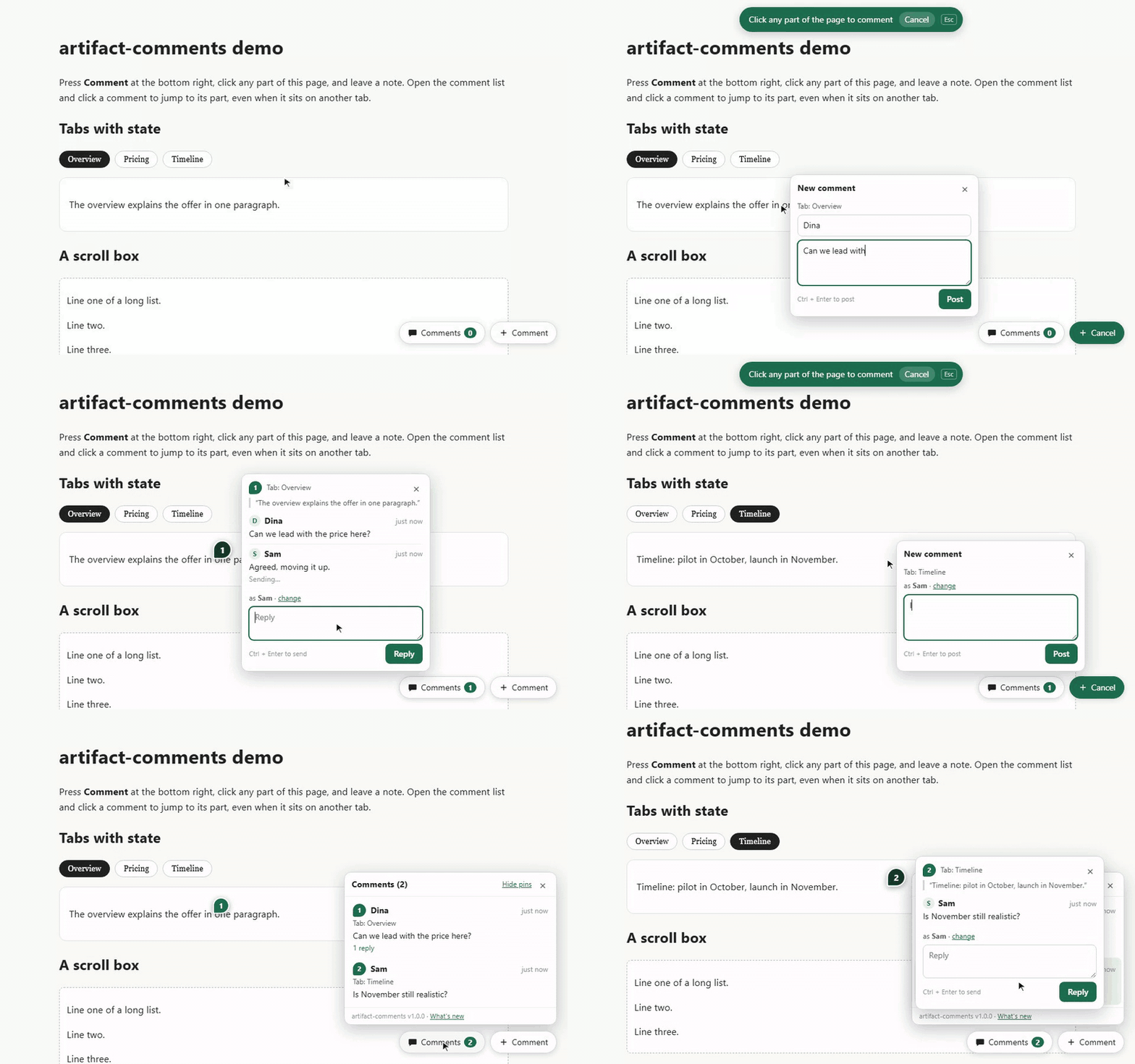
Kabar baiknya
AI udah bikin penjelasan visual jadi gampang.
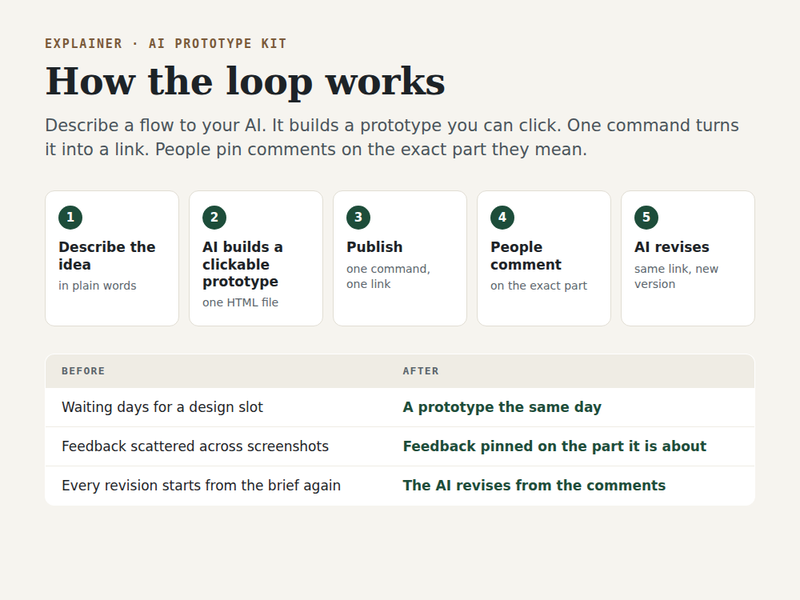
/artifact
Halaman penjelas
Sistem, proposal, atau laporan dalam satu halaman.
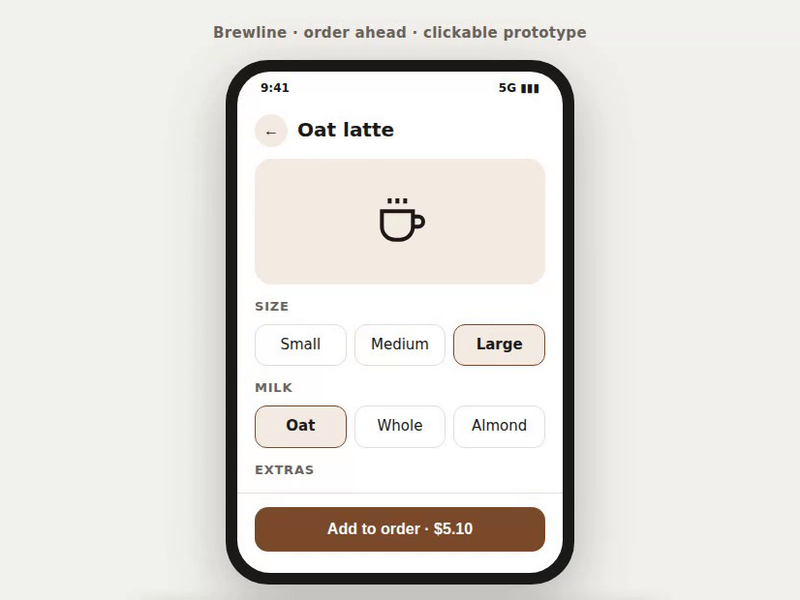
/mockup
Prototype yang bisa diklik
Alur fitur buat demo ke klien atau investor.
Masalahnya
Tapi pas dibagiin, orang bingung komentarnya gimana.
Abis kirim link
Balasannya screenshot WhatsApp dengan lingkaran merah. Tiga orang, tiga chat, tiga versi coretan.
Pas revisi
"Yang kiri atas itu lho." Kiri atas yang mana? Di slide berapa? Versi yang mana?
Dari atasan
"Bagus kok." Terus diem, karena ngasih komentar beneran itu ribet.
Solusinya
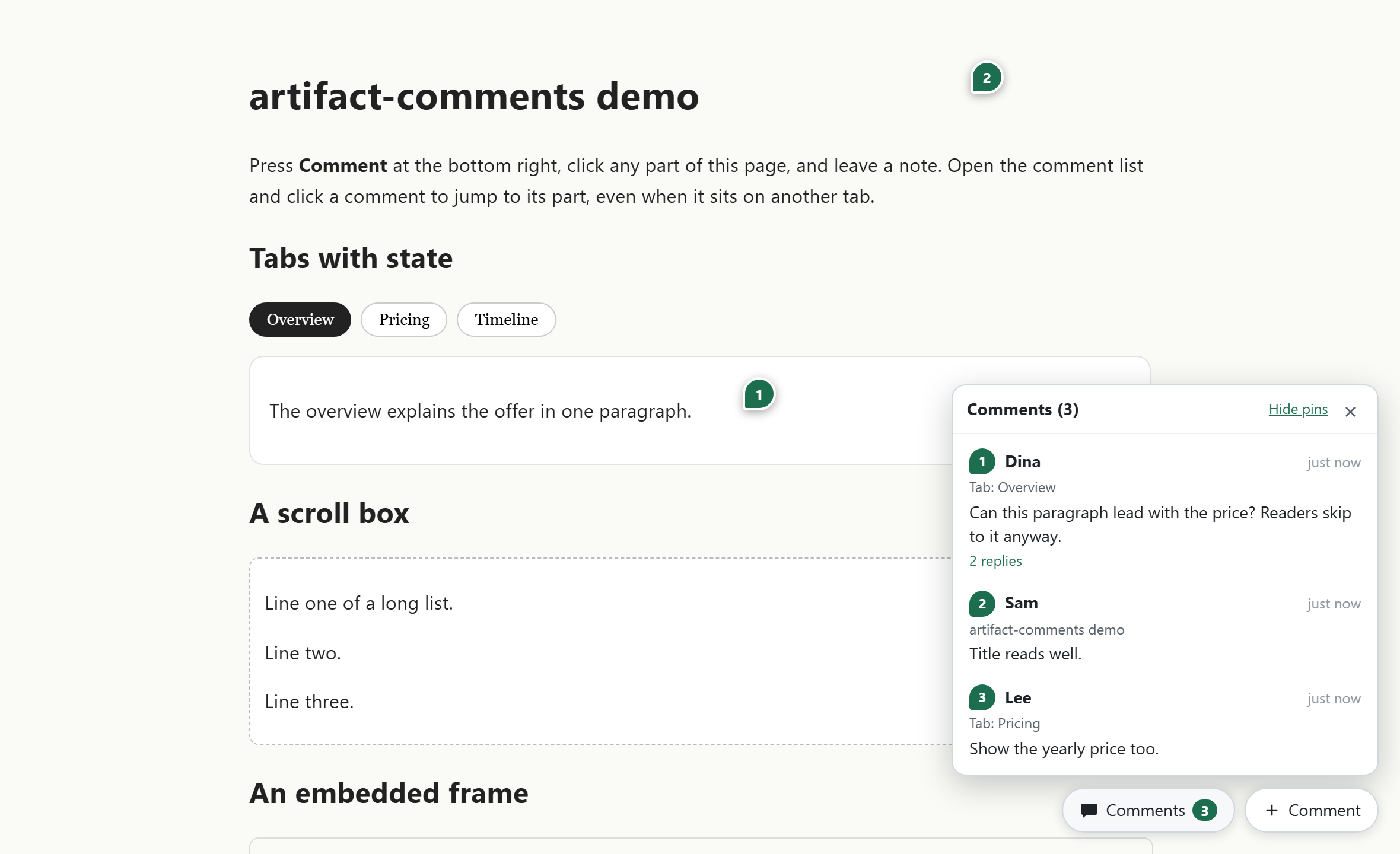
Sekarang tiap bagian halaman bisa dikomentari.
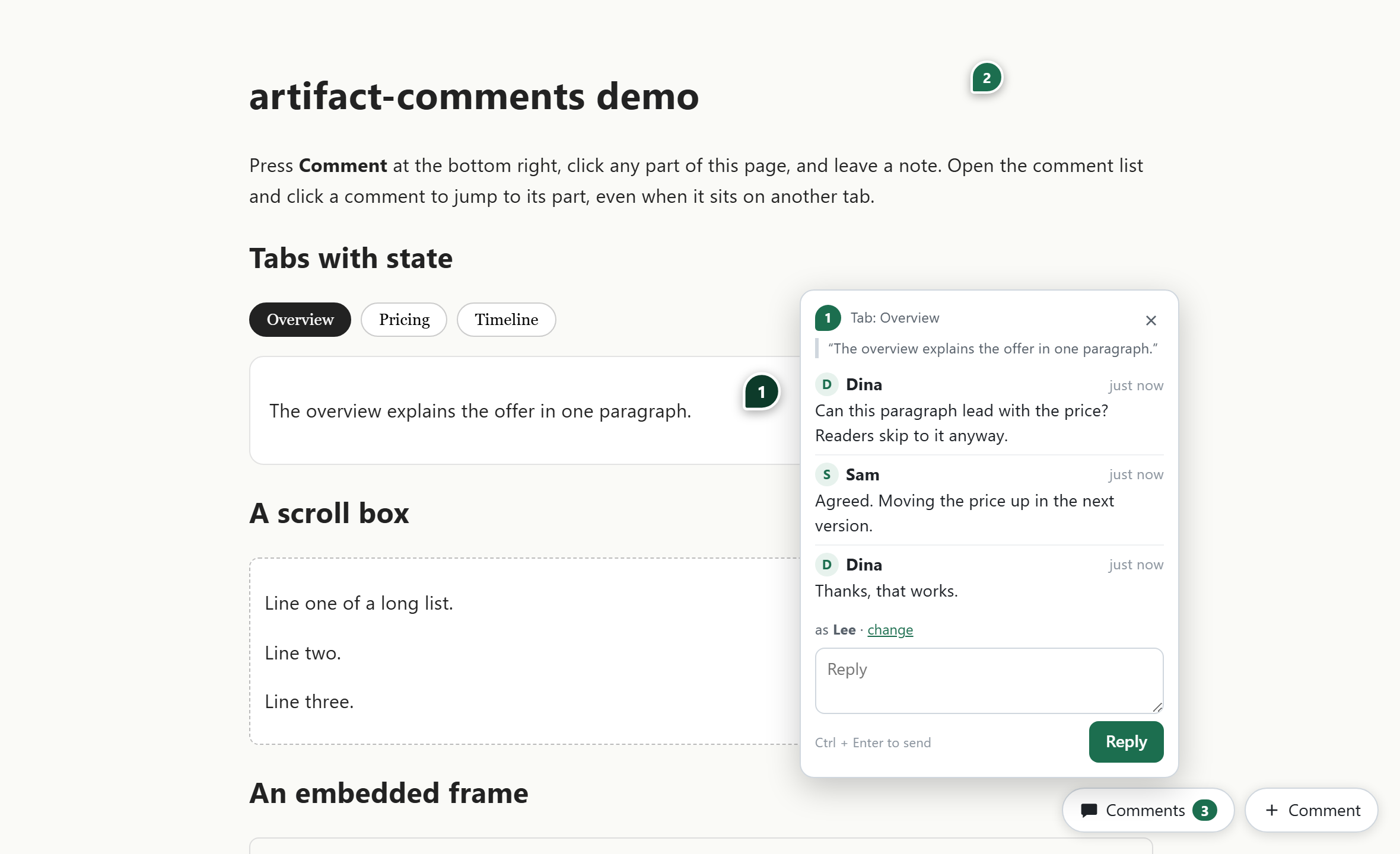
Klik bagian mana pun, tulis, balas. Gak perlu akun. Semua catatan nempel di tempatnya.
Bedanya
Sebelum dan sesudah.
Sebelum
- Feedback dateng sebagai screenshot di banyak chat.
- Nebak "yang ini" maksudnya bagian mana.
- Reviewer harus bikin akun dulu.
- Balasan lo nyasar ke chat yang lain.
Sesudah
- Semua komentar ada di halaman itu sendiri.
- Tiap komentar nempel persis di bagian yang diklik.
- Reviewer cukup ngetik nama.
- Balasan ada di bawah komentarnya, kebaca semua orang.
Cara kerjanya
Tiga langkah, udah.
Reviewer klik Comment
Tombolnya ada di pojok kanan bawah halaman yang lo kirim.
Klik bagian yang mau dikomentari
Tulis nama dan komentarnya. Gak perlu daftar apa pun.
Lo buka link yang sama
Semua catatan nempel di tempatnya. Tinggal lo balas satu per satu.
Yang lo dapat
Yang berubah di hari kerja lo.
- 01
Reviewer gak perlu akun
Cukup ngetik nama sekali, browser-nya yang ingat.
- 02
Tepat sasaran
Tiap komentar jadi pin bernomor di titik yang diklik.
- 03
Satu tempat, lengkap sama balasan
Semua feedback dan jawabannya kumpul di satu daftar.
- 04
Langsung lompat ke bagiannya
Klik satu komentar, halamannya pindah ke bagian itu, walau ada di slide atau layar lain.
Dulu feedback klien buat mockup gw dateng sebagai screenshot di lima chat. Sekarang langsung nempel di halamannya, pas di bagian yang dimaksud.
 Brian Arfi FaridhiProduct Director di Merit · AI Builder · Pembuat alat ini
Lihat jalannya
Keraguan yang wajar
Yang biasanya ditanyain dulu.
- Reviewer perlu daftar?
- Gak. Cukup ngetik nama sekali. Nama itu gak diverifikasi, jadi jangan dipakai buat hal yang butuh identitas.
- Perlu bisa coding?
- Sedikit. Ada satu baris yang ditambahin ke halaman lo, dan kalau halamannya lo bikin pakai AI, minta AI-nya yang nambahin. Tempat nyimpen komentarnya disiapin sekali. Langkahnya ada di bagian teknis.
- Komentarnya disimpan di mana?
- Di tempat lo sendiri: akun Cloudflare lo, atau server lo sendiri. Bukan di server gw.
- Beneran gratis?
- Iya. Lisensinya Apache-2.0, boleh dipakai buat kerjaan kantor. Di Cloudflare, paket gratisnya cukup buat kira-kira 500 komentar sehari.
- Halaman gw jadi berantakan gak?
- Gak. Tampilan komentarnya dipisah dari halaman lo, jadi desain lo tetap apa adanya.
artifact-comments
Minta feedback berikutnya langsung di halamannya.
Pasang sekali, lalu tiap halaman yang lo kirim bisa dikomentari tanpa akun.
Buat yang teknisCara pasang, kebutuhan, lisensi, dan changelog lengkap.
Cara pasang
Dari nol sampai jalan.
Langkahnya diambil dari README repo-nya. Tinggal salin.
Coba dalam 60 detik
Butuh Node 22.13 ke atas. Gak ada yang dipasang dari npm. Buka http://127.0.0.1:8787/demo, tekan Comment di kanan bawah, lalu klik apa aja.
bashgit clone https://github.com/BrianArfi/artifact-commentscd artifact-commentsnode server/node/server.mjs --static examplesSajikan folder halaman lo sendiri
Server-nya nyajiin /artifact-comments.js sendiri, jadi gak ada file yang perlu disalin.
bashnode server/node/server.mjs --static ./my-pagesTambah satu baris sebelum </body>
data-slug nentuin daftar komentar halaman itu. Kosongin buat pakai nama file-nya.
html<script src="/artifact-comments.js" data-slug="my-page" defer></script>Atau jalanin lewat Docker
Image-nya jalanin server Node di port 8787 dan nyimpen database di volume /data. Buat Cloudflare Pages plus KV, ikutin bagian "Choose your backend" di README.
bashdocker build -f server/node/Dockerfile -t artifact-comments .docker run -p 8787:8787 -v ac-data:/data -e ARTIFACT_COMMENTS_TOKEN=change-me artifact-comments
Kebutuhan
- Halaman HTML statis apa pun: explainer, mockup, prototype, deck, laporan.
- Tempat nyimpen komentar: akun Cloudflare dengan Pages dan Workers KV, atau satu server Node yang lo host sendiri (SQLite).
- Docker opsional, kalau mau jalanin server-nya di container.
Lisensi
Apache-2.0
Versi, lisensi, dan changelog dicek ulang ke sumbernya 2026-10-01
Changelog
Apa yang berubah, versi demi versi.
Disalin dari CHANGELOG produknya, dicek 2026-10-01. Versi yang belum terbit gak ditampilkan.
Versi 1.0.1Terbaru1 Okt 2026
Changed
- The README is rewritten around the problem it solves: the shift, the gap, the fix, the loop and a capability table come first. Every technical section is kept. No code changes.
Versi 1.0.030 Sep 2026
Added
- A self-hosted backend,
server/node/server.mjs. It needs Node 22.13 or later and no npm packages: storage is one SQLite file through the built-innode:sqlite. It serves the same/api/commentscontract and validation as the Cloudflare function, runs every POST in one transaction, and can serve a folder of pages with clean URLs (--static). - Owner endpoints on the node server, protected by a token (
--tokenorARTIFACT_COMMENTS_TOKEN): list every page, soft delete a comment with its replies, and restore it. server/node/package.json(enginesnode >=22.13) and aDockerfile.- Opt-in CORS on both backends:
ALLOWED_ORIGINS(a comma list, or*) on Cloudflare,--allow-originon the node server. Preflight requests from an allowed origin are answered, and any other origin gets no CORS headers. comments_cli.py --backend cloudflare|node. Onnode,list,deleteandrestorego through the owner endpoints with--baseand--token.repairandsetupstay Cloudflare only and refuse clearly onnode.- A version line in the Comments panel ("artifact-comments v1.0.0 · What's new") that links to this changelog.
data-changelogpoints it somewhere else. tests/e2e_test.py --backend wrangler|node|bothruns the one browser suite against either backend, plus checks for CORS, byte-accurate size limits, and the owner CLI round trip (post, list, delete, restore) on the node server.LICENSE(Apache-2.0) andNOTICE, so the skill can ship as a standalone repository.
Changed
- The backend is swappable. The browser client still talks to one URL (
GET ?slug=,POSTJSON), set withdata-api, and both backends implement that contract.
Fixed
- Cross-origin pages could not use a comments endpoint on another origin: the server answered the preflight with a bare
204and no CORS headers, although the README said it could. - The 8 KB request limit counted characters, not bytes, so a body of multi-byte text sent without a
Content-Lengthcould pass it. It now counts UTF-8 bytes.
Versi 0.2.030 Sep 2026
Added
- Figma-style pins: each thread is a numbered pin at the exact point that was clicked, and clicking a pin opens its thread.
- A Comments list where every row jumps to its part: it restores the page state, scrolls to the part, flashes it and opens the thread.
- Replies, one level deep. A reply to a reply joins the top thread.
- The adapter API (
window.ArtifactComments:state,restore,isCurrent,search,label,pause) for pages with tabs, slides or walkthroughs. - Hide pins, "Not sent" with Retry for failed or offline posts,
Ctrl+Enterto post andEscto close. - Storage of one key per comment plus a rebuilt per-page summary, so simultaneous posts are never lost and a page view costs one read.
comments_cli.pywithlist,delete(to a trash),restore,repairandsetup.tests/e2e_test.py, 65 browser checks againstwrangler pages dev.- The first standalone packaging as a skill, with a README and a demo page.
- The UI lives in a Shadow DOM attached to
<html>, so page CSS cannot restyle it.
Fixed
- The space bar and arrow keys no longer reach the page while a comment is typed or while comment mode is on.
- A jump to a comment whose recorded page state was wrong now searches the other states until the part is found.
- The comment form flips above the part when opening below it would push the Save button off screen.
Versi 0.1.029 Sep 2026
Added
- An inline click-to-comment layer on one published page: comment mode pauses playback, a click on any element places a numbered marker and asks for a name and a comment.
- Comments were first kept in the reader's browser, with a Copy all button to send them back.
- The same day, shared storage replaced that: a Cloudflare Pages Function (
/api/comments) on Workers KV, so everyone who opens the page sees every comment, and a command to read them back.
AI Skills lain
Masalah lain yang bisa diberesin.
- AI yang inget kerjaan lo, dari kemarin sampai hari ini.AI Second BrainKhusus memberLihat detail
- AI bikin penjelasan visual jadi gampang. Sekarang feedback-nya juga.AI Prototype KitGratisLihat detail
- Biar AI update Google Doc lo, tanpa ngehapus kerjaan orang lain.gdoc-surgicalGratisLihat detail
- Pesan dari AI yang tetap kedengeran kayak lo.voiceprintGratisLihat detail
- Laporan mingguan, notulen, dan prioritas pagi, dikerjain AI. Lo tinggal review.ai-second-brainGratisLihat detail
- Jelasin apa aja dalam satu halaman yang beneran dibaca orang./artifactGratisLihat detail
- Ide lo jadi prototype yang bisa diklik, dalam hitungan menit./mockupGratisLihat detail
- AI lo akhirnya bisa baca WhatsApp kerjaan lo.wa-for-pmSegeraLihat detail